Posting in Facebook Groups: The Complete Guide for Businesses
Everything you need to post in groups without wasting your morning or risking your account: finding groups, writing, scheduling, rules, blocks and automated posting.
This guide covers everything you need to post in Facebook groups without wasting your morning or risking your account. It goes over finding groups, reading the rules, writing your post, scheduling, the first comment, what to do if Facebook blocks you, when automated posting is safe, and how this fits with paid campaigns.
Why Facebook Groups Still Work
The Facebook feed is algorithmic: what you see is based on what the system thinks you’ll find interesting, not who you follow. Groups are the exception. Anyone in the "Residents of Denver" or "Brokers Collaborate" group joined on purpose, to see what’s happening there. That’s the difference between showing up to a random audience and showing up to people who already said they’re interested.
For a small business this matters even more, because it’s the only channel where the cost is time, not money. The downside: it needs regular presence. It’s not a campaign you turn on and off.
How to Find Groups That Matter
Member count is the most misleading metric. A group with 80,000 people and no replies is worth less than a group of 2,000 with daily discussion.
| What to Check | Good Sign | Bad Sign |
|---|---|---|
| Posts per Day | Between 10 and 50 | Less than 2 (no audience) or more than 100 (you’ll disappear) |
| Comments on an Average Post | There’s discussion, not just likes | Zero comments on most posts |
| Ratio of Discussion to Ads | People also ask questions | All ads, no one reads |
| Management | Clear rules, spam is deleted | No active admin, group is flooded |
| Number of Members | Not relevant on its own | Don’t use this as a metric |
Three ways to find them
- Search in the customer’s words. In Facebook’s search bar, filter for “Groups” and use the terms your customers use, not your professional jargon. “Apartments for rent in Columbus” works better than “central residential real estate”.
- Through your existing customers. Visit the profiles of a few satisfied customers and see which public groups they’re in. These are exactly where similar customers are. This is the most accurate method, and most people skip it.
- Through a competitor’s successful post. Found a post with lots of comments? Check which groups it was shared to. These groups are proven.
Once you’ve joined a few, Facebook will start suggesting similar groups. Full guide to building your list: How to build a Facebook groups list for posting.
Group rules: what actually gets you removed
Before you add a group to your distribution list, read its rules. It takes thirty seconds and prevents most removals.
What gets you removed
- Contact details or a link in the post when rules forbid it
- Posting outside the day set for ads
- The same text, word for word, in several groups run by the same admin
- Several posts in a row to the same group
- A post that looks like an ad: emojis in every line, 'Rare opportunity!!!'
What goes through
- A clean post, contact details in the first comment
- Posting on the group’s allowed day
- Slightly different wording in each group
- One post, then a break
- Text that sounds like a person sharing something
If you were removed, don’t post again right away. Message the admin privately, ask what the issue was, and fix it. Admins respond well to people who take their group seriously, and that connection is worth more than one post.
How to write a post that works
In a group, your post doesn’t compete with other ads. It competes with real people’s updates, and that shapes how it should look.
The first line is everything
Facebook cuts off the post after two or three lines and adds 'See more'. If the first line doesn’t stop the scroll, the rest won’t be read, no matter how good it is.
An opening people scroll past
- ‘Hi everyone, I wanted to share that...’
- ‘Rare opportunity! Don’t miss out!’
- ‘A bit about us: we’re a leading company in...’
An opening people stop on
- ‘A 4-room apartment just listed in the Green Neighborhood, move-in September 1’
- ‘Someone asked me today why the insurance didn’t cover it, so here’s the answer’
- ‘We closed the kitchen for renovations, reopening Sunday with a new menu’
Three more rules
- Write like a person. Specifics work better than hype. Price, date, and location beat exclamation marks.
- One call to action. Call, message privately, or comment. Three options at once get zero results.
- Short is better. A post you can read in ten seconds works better than one that needs “See more”. If there’s a lot to say, put the main point in the post and details in a comment.
And a photo: a post with a photo takes up more space in the feed. A real photo from your business works better than a stock image people spot right away.
When to post
There’s no magic hour. Anyone selling you one is making it up. It’s simple: business and professional groups are active on weekday mornings, when people are at work. Local, consumer, and second-hand groups are active in the evening and on weekends, when people are at home.
One thing matters more than timing: consistency. Posting twice a week works better than one perfect post a month, because people buy from those they recognize. Recognition comes from repetition.
The First Comment
This is the simplest technique most people skip, and it solves two problems at once. First, many groups ban links and contact info in the post itself. Second, posts with external links usually get less reach, because Facebook prefers content that keeps people on the platform.
The solution: a clean post with no link, then your own first comment with the link or phone number. This is allowed in almost every group, doesn’t hurt reach, and there’s a bonus: every new comment bumps your post back up in the group feed.
Facebook blocked your posting
In most cases, it’s a temporary limit for a few hours or days, not a permanent block. The message usually says ‘You’re posting too fast’ or ‘This action is temporarily blocked’.
- Stop completely. This is the critical point. Any attempt to post during a restriction just makes it last longer.
- Don’t open another account. This is the violation that turns a temporary block into a permanent one. Facebook detects duplicate accounts by device and IP address.
- Check what’s listed. In “Settings & Privacy” then “Account Status” you can see if a violation was recorded.
- Return gradually. After the restriction ends, start at a third of your previous volume and increase slowly over two weeks.
If you’ve been restricted more than once, the problem is with your method, not bad luck. Full details on every scenario: Post not showing in group.
Automated posting: when it’s safe
Facebook doesn’t ban posting in groups you’re a member of. That’s a legit action. What it flags is patterns that look automated:
| The pattern | Why it looks automated | What to do instead |
|---|---|---|
| Even pace | Posting every 30 seconds exactly. People don’t work at a precise rate. | Vary delays between groups |
| Bulk volume | 50 groups in 5 minutes isn’t a human pace | Limit volume per round, spread over time |
| Continue after a warning | Facebook slows down, the tool keeps pushing | Stop automatically when you get a warning |
This is what separates a safe tool from a risky one. More on what to compare: Software for posting in Facebook groups.
Groups vs. paid campaigns
They don’t replace each other, and ‘which is better’ is the wrong question.
| Groups | Sponsored campaign | |
|---|---|---|
| Cost | Time | Money, every month |
| Speed | Weeks before anyone notices you | Instant exposure |
| Audience | Already showed interest in the field | Demographic targeting, not always relevant |
| What happens when you stop | Recognition and reputation stay | Stops as soon as the budget runs out |
| Best when | You have more time than budget, and your product sells on trust | You have a proven message and a fixed monthly budget |
In practice, most small businesses start with groups. You can start today without spending anything, and add paid campaigns once you know what message works.
Types of groups and how to act in each
The common mistake is treating all groups the same. A closed group where every post needs admin approval is very different from an open notice board.
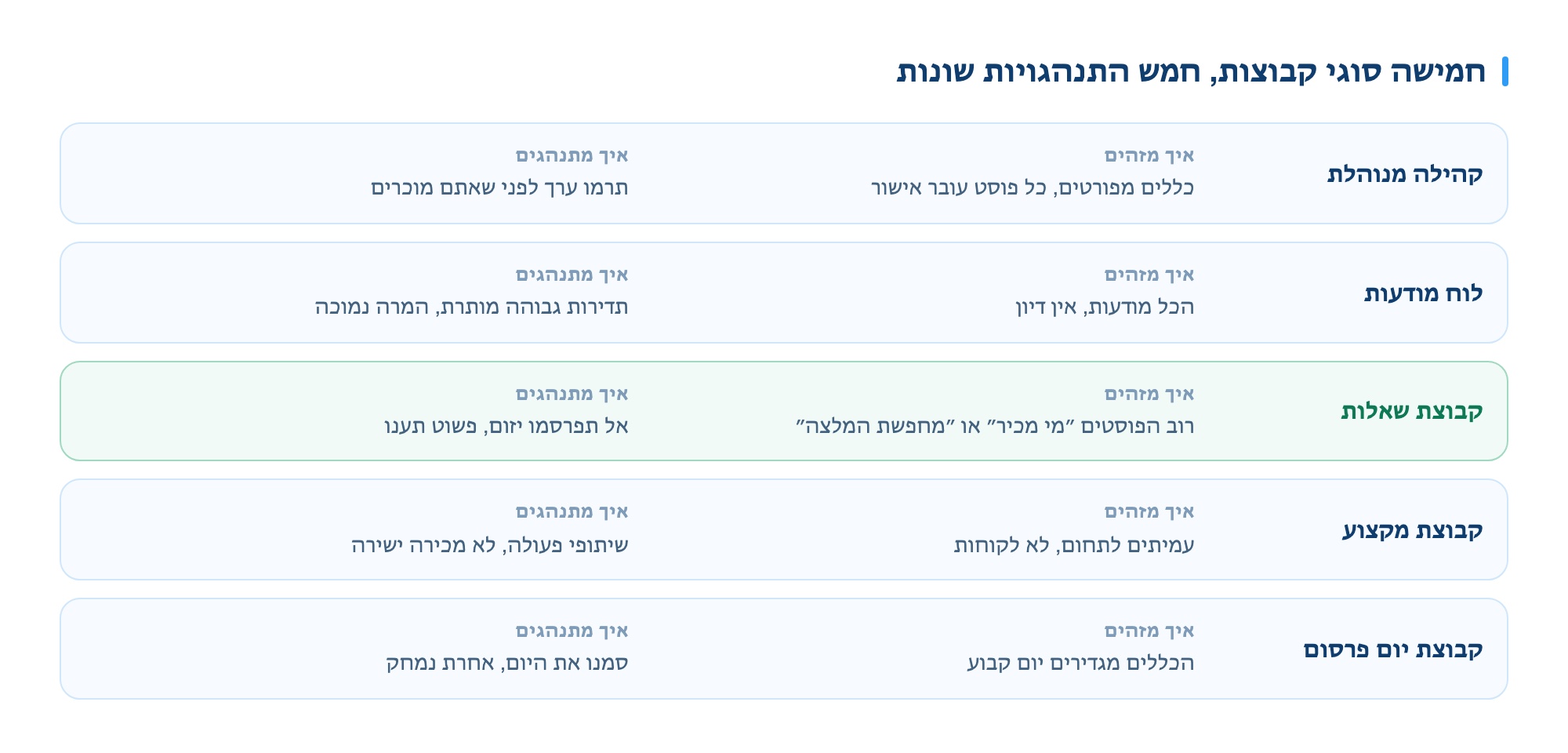
| Group type | How to check | How to act |
|---|---|---|
| Managed community | Detailed rules, active admin, every post needs approval | Worth the effort. Give value before you sell, and your posts will get through |
| Notice board | All ads, no discussion, no pre-approval | Higher posting frequency is allowed, but conversion is low. Don’t spend time writing for these |
| Question group | Most posts start with “Who knows” or “Looking for a recommendation” | The real gold. Don’t post ads, just answer. A good answer does more than any ad |
| Professional group | Peers in your field, not customers | Collaboration and referrals, not direct sales |
| Promo day group | Rules set a specific day for ads | Mark the day on your list. Posts on other days are deleted automatically |
Group admins are your first customer
This is where most businesses miss out. An admin can delete or block you, or make you the group’s go-to provider. Building a relationship with them pays off more than any writing trick.
- Introduce yourself before your first post. A short message to the admin explaining who you are and asking what’s allowed takes a minute and solves most issues in advance.
- Don’t argue about deletions in public. If your post was deleted, message privately. Arguing in the comments ends your presence in the group.
- Contribute without asking. An admin who sees you answering others’ questions will approve your ad without a second thought.
- Respect the posting day. If the group only allows ads on Tuesday, don’t try to bypass it. This is what annoys admins most.
How to know if it’s working
The common mistake is counting likes. Likes don’t pay. These are the metrics that matter:
| Metric | How to measure | What it means |
|---|---|---|
| Direct inquiries | Count private messages and conversations that came after posting | The only metric that really matters |
| "Where did you hear about us?" | Ask everyone who contacts you. Track it in a spreadsheet. | Shows which group actually brings results |
| Comments and questions | Not likes, comments with a question | Shows your post was read, not just scrolled past |
| Approval rate for posts | How many posts were approved vs. rejected | If it drops, something in your wording or frequency is off |
| Friend requests | People who add you after a post | Building a long-term audience |
After two months of tracking, you’ll know which five groups bring eighty percent of your leads, and you can drop the rest. This is the biggest improvement you can make, and it costs nothing.
Seven common mistakes
- Joining fifty groups in one day. This is suspicious by itself and can get you restricted before you post anything. Join gradually.
- Posting right after joining. Wait a few days, read the group, get the tone. Admins spot those who join just to post.
- Copying the same post word for word. Both Facebook and admins detect duplicates.
- Selling in your first post. In community groups, this almost always fails.
- Ignoring the comments. If someone comments and you don’t reply, it shows you’re not really there.
- Measuring likes. See the previous section.
- Giving up after two weeks. This channel is built on ongoing relationships, and two weeks is just the start.
Two notes specific to the Israeli market
Weekends. Israeli groups behave differently from Friday afternoon to Saturday night. In local and consumer groups, activity actually rises on Saturday; in business groups, it stops completely. If you schedule posts, keep this in mind.
Holidays. Before holidays there’s a spike in demand in almost every field, and at the same time, ad volume surges. A generic post on a holiday eve gets lost. What works is a specific offer with a clear deadline.
Detailed guides by topic
Each topic here has its own page, with more details not covered in this guide:
- Tool comparison - the five Israeli group-posting tools, their published prices, and what actually separates them.
- Automatic posting in groups - what Facebook actually bans, what triggers detection, and the difference between browser and server tools.
- Posting blocked and what to do - the three types of restrictions, how to tell which you got, and what extends them.
- How to write a post that gets leads - the first line, body structure, and four ready-made templates.
- Best times to post - hours by group type, Israeli weekends and holidays, and frequency.
- Scheduling posts in advance - what’s possible in Facebook, what’s only for group admins, and how to build a monthly calendar.
- Groups vs. paid ads - comparison by cost, time, lead type, and when to combine.
- How much Facebook ads cost - real price ranges, what each budget buys, and the costs you don't see up front.
- Sponsored ads for beginners - Boost vs Ads Manager, choosing an objective, and a first campaign that doesn't burn budget.
Guides by category
Each field has its own groups, rules and habits:
- Posting properties in Facebook groups for agents
- Marketing for insurance agents in Facebook groups
- Marketing your local business in Facebook groups
- How to build a group list for posting
- The post doesn’t show up in the group, what to do
- Professionals and contractors
- Beauticians and salons
- Restaurants and cafes
- Venues and event suppliers
- Coaches and consultants
Want to see how it works
If you are posting manually to more than a few groups, it’s worth seeing how much time you save. Leave your details and a rep will get back to you by the next business day with a live demo on your groups.