Facebook blocked your group posts: what it means and what to do
Most people who get blocked do exactly what makes it last longer. First, check which restriction you got. There are three types, and each one needs a different response.
The message comes without warning: “You can’t do this right now.” Before you try again or open a new account, know that there are three similar-looking restrictions, and each one needs the opposite response.
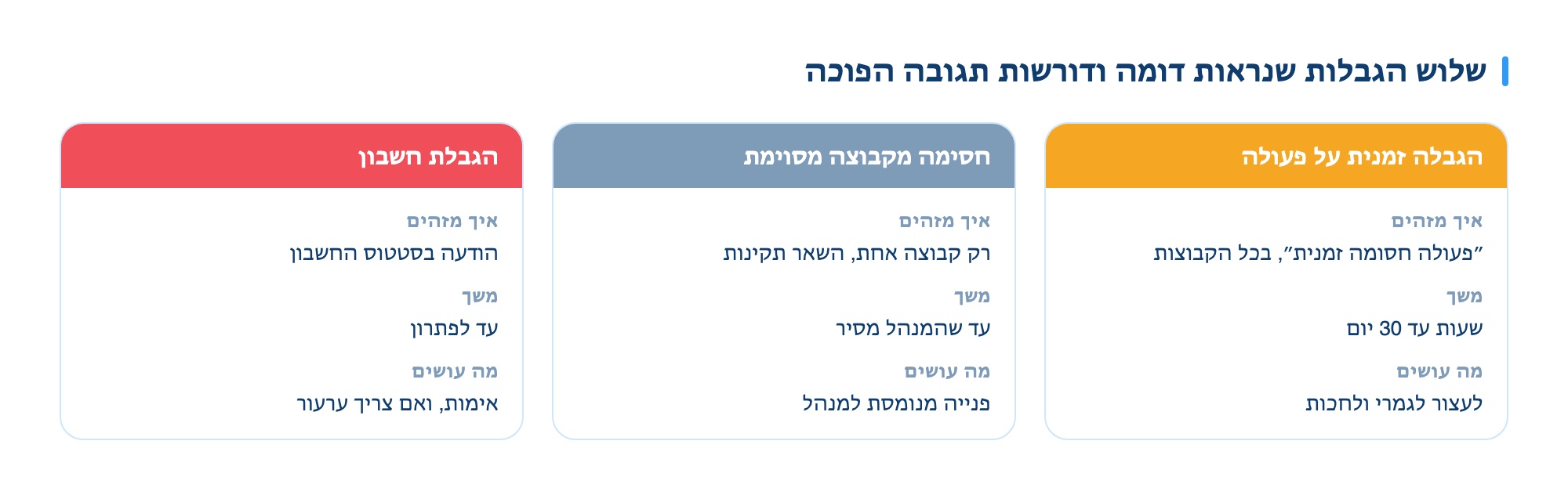
Three restrictions that are easy to mix up
| What happened | How to check | Duration | What you’ll do |
|---|---|---|---|
| Temporary action block | “Action blocked temporarily” in all groups | Hours up to 30 days | Stop completely and wait |
| Blocked from a specific group | Just one group, others are fine | Until the admin removes it | Send a polite message to the admin |
| Account restriction | Message in account status, sometimes asks for verification | Until resolved | Complete verification, and appeal if needed |
Why it happened
Facebook’s detection system doesn’t check if you used a tool. It looks for patterns people don’t make, and just one is enough:
- Frequency. Many posts in a short time, especially at regular intervals.
- Duplication. The same text, word for word, in several groups - sometimes with overlapping admins.
- Sudden increase. An account that posts at one pace for years and suddenly ramps up.
- Reports. Several group members reporting a post is a strong signal by itself.
- Mass joining. Joining many groups and posting in them right away.
- Links. The same external link posted repeatedly, especially to a new or shortened domain.
More detail on what is and isn’t a risk is on the auto-posting in groups page.
Four things that make the block last longer
These are the mistakes most people make in the first fifteen minutes. Each one makes things worse:
- Trying again and again. Every attempt during a block is counted, and often extends it. This is the most common mistake.
- Opening a new account. Facebook links accounts by device, IP, and behavior. A new account right after a block gets flagged quickly, and doesn’t have the history that protected the old one.
- Switching to your phone. The block is on the account, not the device. This doesn’t bypass anything and just adds another signal.
- Appealing every block. Appealing a short temporary block usually doesn’t speed things up, and sometimes triggers another review. Save appeals for real cases.
What you should do, step by step
- Stop completely. No posting, no joining groups, no friend requests. One quiet day is worth more than any workaround.
- Check your account status. "Settings & Privacy" then "Account Status" shows what was triggered, why, and until when.
- If there’s a verification request, complete it. Verifying your identity or phone number solves some blocks right away.
- Delete what flagged you. If there’s a post that got reported, remove it yourself.
- Come back slowly. After the block ends, keep activity much lower for the first week. Going back to your old pace right away usually brings the block back, often for longer.
When the block is from one group
This is a completely different case, and it’s handled by a person, not an algorithm. A group admin can remove a post, mute you for a while, or remove you.
- Don’t argue in comments. Public arguments with admins end your presence in the group, even if you’re right.
- Send a short, direct message. A sentence that acknowledges the rule you broke and asks what’s allowed works much better than complaining.
- Read the rules before you return. Most deletions happen for two reasons: contact details in the post, or posting on the wrong day.
- If there’s no response, remove the group from your list. A group you’re blocked in just takes up space and gives nothing back.
How to avoid it next time
After the restriction ends, the only question left is how not to go back there. Six practical rules:
| Rule | Why |
|---|---|
| Vary intervals between posts | A fixed interval is the clearest sign of automation |
| Slightly different wording in each group | Prevents duplicate detection and works better with admins |
| Gradually increase your activity | A sudden jump is the signal itself, not the amount |
| Wait a few days after joining | Posting right away in a new group is a clear spam pattern |
| Links in the first comment | Reduces risk and also bypasses many group rules |
| Stops immediately on any warning | Insisting is what turns a short restriction into a long one |
If your post just doesn’t show up and there’s no block message, it’s probably not a restriction. There’s a separate page on posts not showing in groups that covers the other four cases.
Want to post without taking risks?
Leave your details and we’ll show you what a posting round looks like at a pace that doesn’t flag your account.
For a free demo