My Facebook group post isn’t showing - why and what to do
Before you post again: it’s almost always one of four reasons. In some cases, reposting is exactly what makes it worse.
You posted in a group and the post isn’t showing. Before you post again: it’s almost always one of four reasons, and only one needs urgent action. Important: Don’t repost before you read this. In some cases, reposting makes things worse.
1. The post is waiting for admin approval
This is the most common reason. Many groups require admin approval for every post. Usually you’ll see a message like "Your post is pending approval" right after you send it.
What to do: Wait. Approval time depends on the admin - sometimes minutes, sometimes days, and in large groups sometimes not at all. You can see your pending posts under “Your Activity” in the group.
2. The post was rejected and you didn’t get a notice
Admins can reject a post without telling you. If a few days have passed and the post isn’t showing and isn’t in the pending list, it was probably rejected.
What to do: Read the group rules again. Common reasons: contact info or a link in the post, posting on the wrong day, or a post that looks like an ad. You can message the admin privately and ask - most admins reply if you’re polite.
3. Facebook has temporarily restricted you
If the post doesn’t go into any group, and you see a message about "Action blocked temporarily" or "You’re posting too fast" - this is an account-level restriction, not an admin decision.
What to do:
- Stop completely. Any attempt to post during a restriction extends it.
- Don’t open another account. This is the violation that turns a temporary block into a permanent one.
- Check under "Settings & Privacy" → "Account Status" for any violations.
- When the restriction ends - return at a third of your previous volume and increase gradually over two weeks.
4. The post is visible to you but not to others
Sometimes the post looks fine when you check, but no one else sees it. Two possible reasons: it’s pending approval (and you see your own version), or Facebook reduced its reach - which mostly happens to posts with an external link.
What to do: Check in incognito mode or on another device. If it’s a link, try putting it in the first comment instead of in the post.
How to check in a minute which case it is
Before you do anything, two checks separate the four cases:
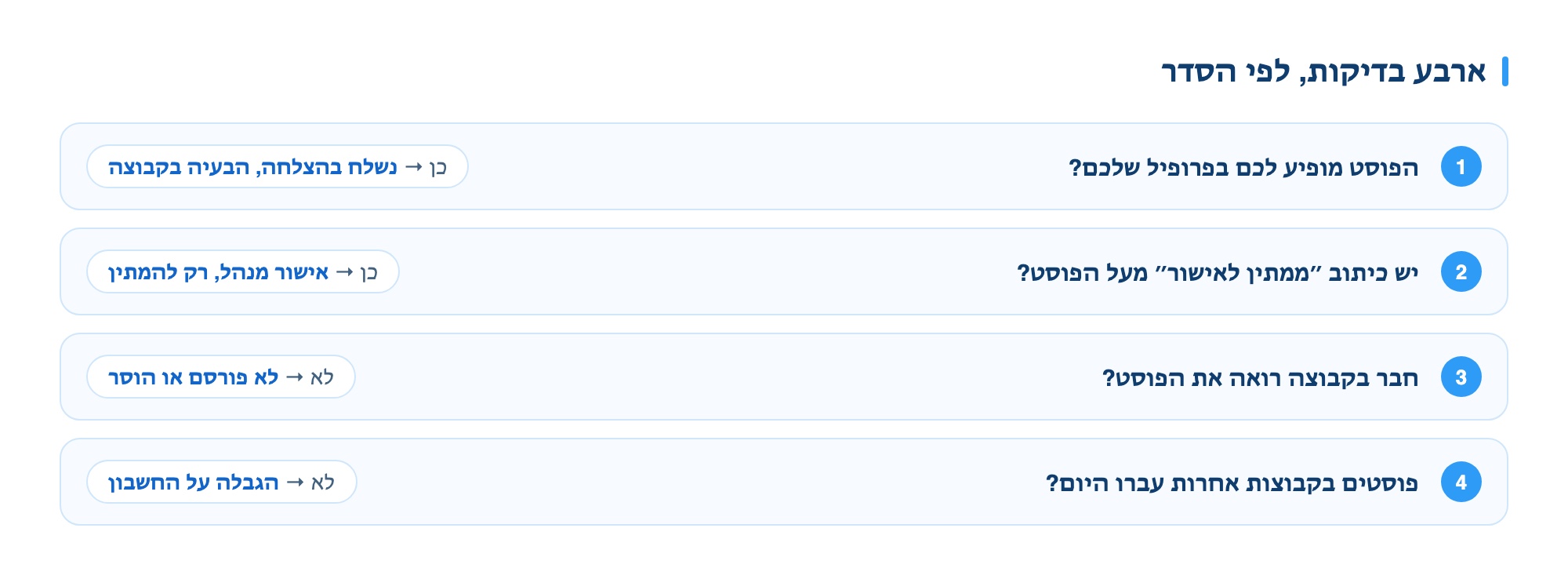
| The check | What you see | What it means |
|---|---|---|
| Is this happening in one group or all of them? | Only in one group | Admin: Pending approval or declined |
| In all groups | Account-level restriction | |
| Incognito: Does the post appear? | It appears | The post is live. The issue is reach. |
| It does not appear | Pending approval or deleted |
How to check in two minutes
Before guessing, you can narrow it down with a quick check. The order matters, because each step rules out a different reason.
| Check | If yes | Conclusion |
|---|---|---|
| Does the post appear on your profile? | Yes | It was sent successfully. The issue is with the group, not you. |
| Is there a “Pending approval” label above the post? | Yes | Admin approval. No issue, just wait. |
| Can a group member see it? | No | The post was not published or was removed. |
| Did you get a removal notification? | Yes | Removed by admin. Check the group rules. |
| Did posts in other groups go through the same day? | No | Temporary account restriction, not a one-off issue. |
How long admin approval takes
This is the most common reason, and most people draw the wrong conclusion. A post waiting for approval is not a failed post, and reposting will not push it forward.
- No standard time. A group with an active admin approves in hours. A group with one busy admin can take days.
- Don’t repost. Two identical posts in the queue increase the chance both will be rejected, and mark you as a pushy poster.
- In groups with a set posting day a post sent on another day just won’t be approved, usually without notice.
- After three days you can message the admin briefly and clearly. This works better than reposting, and builds a connection for next time.
How to prevent this in advance
- Read the group rules before your first post, and note groups with a fixed posting day.
- Don’t add a link or phone number in posts where the group forbids it.
- Don’t post the exact same text in several groups with the same admin.
- Spread your posts over time instead of posting everything at once.
This last point is exactly what a good posting tool should do for you: spread posts at a human pace, limit volume per round, and show you which post went through, which is pending, and which was rejected - so you don’t have to find out yourself. More: Software for posting in Facebook groups.