Automatic posting in Facebook groups: what’s allowed, what’s risky, and how to choose
The real question isn’t "is it legal" but "what actually gets Facebook to block you". That difference decides if you work quietly or lose your account.
When you search for "automatic posting in Facebook groups" you get two kinds of answers. The first is providers promising hundreds of groups at a click, with no mention of risk. The second is articles saying it’s risky, without explaining what the risk is. Neither helps you decide.
This page separates what actually puts your account at risk from what doesn’t, because the real difference isn’t "manual" vs "automatic" but something else entirely.
What counts as automatic posting
The term covers three very different things, and most confusion starts because they all get called the same name:
| Type | What actually happens | Risk level |
|---|---|---|
| Scheduling | You write a post, and it goes out at the time you set | Low. Facebook itself gives this option to group admins |
| List distribution | The same post goes to groups you choose, with delays between them | Risk depends on speed, wording, and account age |
| Bot | A program joins groups, collects data, and posts non-stop | High. This is what Facebook built entire systems to detect |
Most people searching for "automatic posting" mean the second row, but Google results often show them the third. That’s where many stories about blocked accounts come from.
What Facebook actually forbids
It’s worth reading the terms of use instead of relying on rumors. What is prohibited there is about behavior, not technology:
- Inauthentic behavior. Fake accounts, impersonation, running a network of profiles. This is the most serious category.
- Automated data collection from the site without permission. This is what blocks bots that scan groups and collect names and phone numbers.
- Spam. Repeated, misleading, or mass content meant to push people off the platform.
- Sharing login details with a third party. Most people don’t know this rule, but it’s directly relevant to choosing a tool.
What really triggers the detection system
Facebook’s protection systems don’t look for a “tool”. They look for patterns a real person wouldn’t make. These are the five that get accounts flagged most often:
- Uniform timing. Posting exactly every 30 seconds is the clearest sign of automation. No person does anything at the exact same interval, over and over.
- Identical text word for word. The same post in twenty groups is recognized immediately, and admins who are in several groups see it too.
- Sudden jump in volume. An account that posted three times a week and suddenly posts forty a day signals a sharp change.
- Mass joining and immediate posting. Joining dozens of groups and posting in them on the same day is the classic pattern of an account meant for spam.
- Logging in from a new location. If the tool posts from a server, Facebook sees your account active from two places at once, sometimes from two countries.
Notice what all five have in common: none of them is “you used software”. They all describe behavior you could do by hand, and can avoid even with a tool.
The architecture question: browser or server
This is the most important decision when choosing a tool, and it’s almost never clearly shown on sales pages.
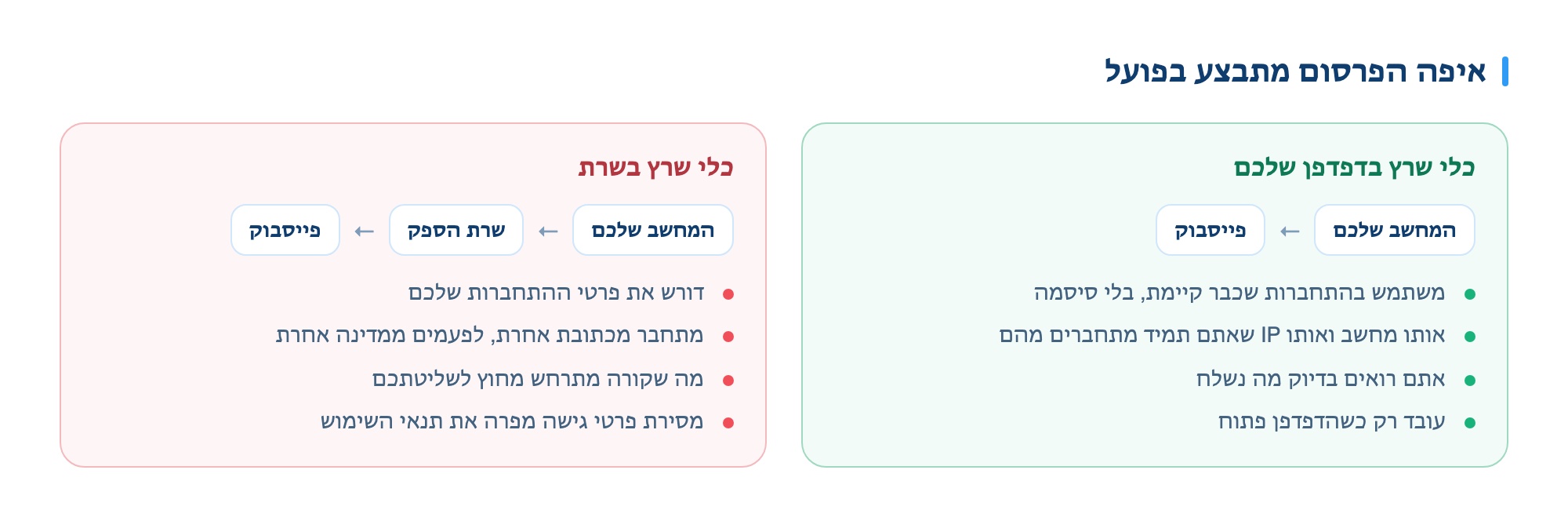
A tool that runs in your browser
- Uses an existing login, no password needed
- Same computer and IP you always use
- Works only when your browser is open
- You see exactly what is sent
A tool that runs on a server
- Requires your login details
- Connects from a different address, sometimes a different country
- Works even when your computer is off
- What happens is out of your control
Both methods work technically. The difference is what happens when something goes wrong: with a browser tool, the worst is a temporary posting limit. With a server tool, you’ve given your password to someone you don’t control, and it’s a clear violation of the terms of use that can justify closing your account.
Postly is a browser extension for this reason: it posts from your account, on your computer, without giving your password to anyone. More on what else to check before choosing is in the software selection guide.
How to use this without risk
These guidelines apply whether you post manually or with a tool. They describe what a safe account looks like:
- Variable delays, not fixed. A range of a few minutes between groups, not a set number.
- Change the wording between groups. Same message, slightly different words. This lowers risk and works better with admins.
- Start small and scale up slowly. First week at low volume, then gradual increase. A sharp jump is the signal itself.
- Don’t post in groups you joined today. Wait a few days, read the rules.
- Stop if you get a warning. Trying to continue after a temporary block is what makes it last longer.
- Spread posts throughout the day. Three small rounds are better than one big one.
If you’ve already seen a block message, there’s a separate page explaining what each type of restriction means and how long it lasts.
What to ask a provider before you pay
Seven questions that separate a tool from a risk. If a provider avoids any of them, that’s your answer:
- Does posting happen from my browser or your server? The most important question on the list.
- Do you ask for my password? If yes, that’s a violation of Facebook’s terms, not just a security risk.
- Are the delays fixed or variable? Fixed delays are a sign of automation.
- Does the system change the wording between groups? Without this, you’re sending identical content, which is the first red flag.
- What happens when Facebook slows me down? A good system stops. A bad one keeps pushing.
- Can I see what was approved, what is pending, and what was rejected? Without this, you’re posting in the dark.
- Is there a commitment? And if so, what happens in the second month.
When automatic posting isn’t the answer
A tool multiplies what already works. It doesn’t turn something that doesn’t work into something that does, so sometimes it’s not the right investment:
- If you’re in only three or four groups total. Manual posting takes less time than learning a tool.
- If posts don’t get responses when you post manually. Wider distribution of a message that doesn’t work will just add noise.
- If the account is new. Give it a few months of regular activity first.
- If your list hasn’t been checked. It’s worth building a checked list before speeding up.
The simple rule: if manual posting to five groups gets you leads, a tool that gets you to twenty will pay off. If it doesn’t, the problem isn’t scale.
Want to see how it works on your groups?
Leave your details, a rep will get back to you by the next business day and show the system running on your group list.
For a free demo